
You are here: Start » Filter Reference » Computer Vision » Line Finder » FindSingleLine (FindLines Single)
FindSingleLine (FindLines Single)
 Basic
Basic| Module: | MetrologyPro |
|---|
Finds a single straight line within a rectangular scan field.
Applications
| Name | Type | Range | Description | |
|---|---|---|---|---|
 |
inImage | Image | Input image | |
|
inScanField | SegmentScanField | Region where the scans are performed | |
|
inScanFieldAlignment | CoordinateSystem2D* | ||
|
inScanWidth | Integer | 1 -  |
How many pixels are sampled perpendicularly at each scan line's positions |
|
inScanStep | Integer | 1 - |
Pixel distance between the centers of consecutive scan lines |
|
inScanLimit | Integer | 1 - |
Maximum number of scan lines |
|
inEdgeScanParams | EdgeScanParams | Parameters of 1D edge detection along a single scan line | |
|
inPointBlindness | Real | 0.0 - 1.0 | Defines a threshold for rejecting edge points that are weaker than a certain portion of the strongest edge point |
|
inMaxSlant | Real | 0.0 - 45.0 | Maximum angle deviation of the resulting line from 90 degrees to the scan axis |
|
inMinLength | Real | 0.0 - |
Minimum length of the resulting line |
|
inMaxGap | Real | 0.0 - |
Maximum gap within a resulting line |
|
inMinPointCount | Integer | 2 - |
Minimum number of edge points that a resulting line must contain (otherwise it is rejected) |
|
inLineSelection | LineSelection | Selection criteria for edge lines | |
|
inLineBlindness | Real | 0.0 - 1.0 | Defines a threshold for rejecting entire lines that are weaker than a certain portion of the strongest line |
|
inEdgeMeasure | EdgeMeasure | Several options for measuring a single edge point | |
|
inLineFinderMethod | LineFinderMethod | Several alternative algorithms for finding lines within the detected cloud of edge points | |
|
inMaxPointDeviation | Real | 0.0 - |
Maximum pixel distance between a detected line and its supporting edge points |
|
inMaxTurnAngle | Real | 0.0 - 90.0 | Maximum turn angle at any interior vertex of the line path |
|
inOutlierSuppression | LineMEstimator* | A method for removing outlying points | |
|
inRefineEndpoints | Bool | Turns on a method for refining the length of the detected line | |
 |
outLine | Segment2D? | ||
|
outLineStrength | Real | ||
|
outResponseProfiles | ProfileArray | Edge response profiles, one per scan line | |
|
outAlignedScanField | SegmentScanField | ||
|
outSelectedPoints | Point2DArray | List of points associated with the returned line | |
 |
diagScanLines | Segment2DArray | Positions of the scan lines placed within the scan field | |
|
diagCandidatePoints | Point2DArray | Edge points detected on the scan lines, after inPointBlindness filtering | |
Description
The operation finds the best-fitting straight line within the inScanField. Internally, it places up to inScanLimit scan lines perpendicular to the field axis, spaced inScanStep pixels apart, and detects candidate edge points on each line using inEdgeScanParams. The candidate points are assembled into straight-line hypotheses by the algorithm selected with inLineFinderMethod, and the best hypothesis is chosen according to inLineSelection and refined into a subpixel-precise segment. If no line satisfying the detection constraints is found, outLine is set to NIL.
Hints
- Activate diagCandidatePoints and diagScanLines during development to verify that candidates appear on the right scan lines before adjusting higher-level parameters.
- Adjust inEdgeScanParams.MinMagnitude first: a value that is too high misses real edges; too low fills the result with noise candidates.
- Increase inScanStep to speed up execution on large scan fields. Keep it small (5–10 px) when the line is short or its position varies rapidly across the field.
- inPointBlindness suppresses weak per-scan-line candidates relative to the strongest response on that line. A value of 0.3 discards candidates below 30 % of the highest value on that scan line.
- If a detected segment is shorter than the actual line, try increasing inMaxGap, widening inMaxPointDeviation.
- Set inMaxSlant to the maximum expected deviation of the line from the direction perpendicular to the scan field axis. Narrowing this range reduces false positives.
- Use inLineSelection = Fittest for the straightest line, Strongest for the highest-contrast line, and Smoothest for gently curved or slightly wavy lines.
- Connect inScanFieldAlignment to a coordinate system to automatically adapt the measurement to the object position in each frame.
Examples
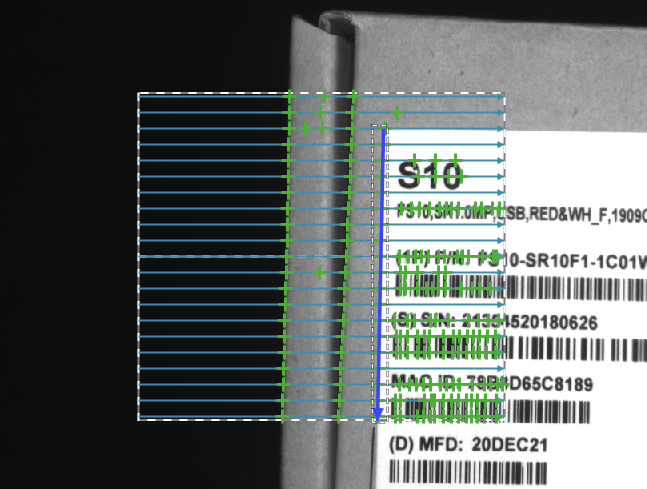
FindSingleLine locating a single line with inLineSelection = Brightest. The dashed rectangle is the scan field, blue lines are the scan lines, green dots are the candidate edge points, and the blue line is the detected line.
Remarks
Read more about Local Coordinate Systems in Machine Vision Guide: Local Coordinate Systems.
Hardware Acceleration
This operation supports automatic parallelization for multicore and multiprocessor systems.
Complexity Level
This filter is available on Basic Complexity Level.
Filter Group
This filter is member of FindLines filter group visible as Single.
See Also
- FindMultipleLines – Finds multiple straight lines within a rectangular scan field, ordered from highest-scoring to lowest.
- FitSegmentToEdges – Performs a series of 1D edge detections and finds a segment that best matches the detected points.
